In order for neatComponents to serve websites for your organization you have to tell the Internet world 'who you are' and 'where you are'.
'Who you are'
You will need a domain name - for example, ours is: neatcomponents.com
'Where you are'
When you register your domain name, you also get several 'records' which tell Internet traffic how to locate your servers.
Your 'A-record' holds the IP address of your website.
If your website is currently being handled by someone else - commonly your ISP - you will need to tell the domain name registrar (where you registered your domain) to change your A-record to point to your neatComponents machine. You can often do this yourself.
In order to run your own web server you must have a permanent Internet connection with a fixed IP address. Business Internet connections normally have fixed IP addresses, and it is usually possible to ask your ISP for one for SO-HO or home use.
If you are using Amazon AWS EC2 you need to allocate an 'Elastic IP'
If you connect to the Internet via a router or firewall - and most people do - then you will need to configure Port Forwarding or NAT to route traffic for Port 80 to the neatComponents machine. You may also need to open any firewalls on Port 80.
Don't worry about network security on this port forward - neatComponents provides an internal firewall to protect your local network.
Setting your A-Record
You register your domain with a Domain Registrar. This may be your ISP, but is more often a company who specializes in domain registration - there are many to choose from (click to see). Nearly all Registrars allow you change your own settings using some sort of 'console'.
The setting change you need to make is very simple - you need to set the A-Record for your domain to the Public Facing IP Address of your Internet connection. We will have told you this IP address if you are using our Cloud service, and this is the Elastic IP address if you are using an Amazon EC2 instance.
Self-hosting
Your ISP will have told you that when you signed up, and it is probably on your billing statement, but you can use the tool in this box to check at any time. You must test from a browser on the actual machine you have installed neatComponents onto.
What is my Public Facing IP Address?
Use this link from the neatComponents machine itself. |
Once you have your Public Facing IP address, go to your account at your Domain Registrar and select the 'Total DNS Control' option. It may be called something slightly different, but you need to see a dialog similar to the one below. Do not confuse this with 'Domain Forwarding' or 'Frame-set Redirect' which may be other options.
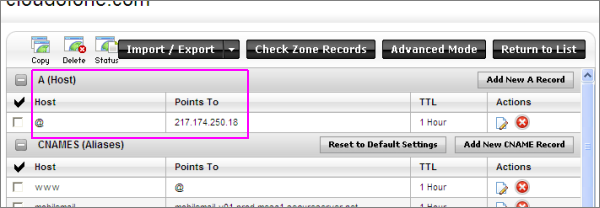
In this example we had found that our neatComponents was installed onto a machine at 217.174.250.18
The 'Host' www points to @ (the default) and we have set that to point to 217.174.250.18
If you have a dynamic IP address read this...
Sub-domains
It is common to want to use a sub-domain as well as the host name 'www' - most often it is to provide the access to the neatComponents Server Manager (e.g. http://hosting.example.com) but sub-domains are also often used to provide temporary access to site previews, or websites with special features.
You set-up a sub-domain by adding a new CNAME Record at your Domain Registrar's 'Total DNS Control' option and set it so that it points to the Public IP Address of your neatComponents server. In the example above you would add a 'Host' called 'hosting' and point it to '@' - which in turn points to the IP Address.
So, someone browsing to http://hosting.example.com will go to the log-in page of the neatComponents Server Manager.
Sub-domains and server management
One of the most common uses of a sub-domain is to provide an address for managing your neatComponents server. So, for instance, if you are serving the website www.example.com you would use the primary domains www.example.com and example.com for the website itself, and create a sub-domain with its own A-Record of say, admin.example.com which is used to access the neatComponents server for this website and all other websites hosted on the server.
If you are a web development company then it would be more appropriate for the admin access to be a sub-domain of your company's primary domain, rather than of one of your customers domains.
Remember that your neatComponents can host an unlimited number of websites, so you may have many separate domains all pointing to the same IP address.



