Components Reference > Email Table Loader The Email Table Loader component allows emails to be read from disk and loaded into a Table.
The component reads emails stored on disk in the standard RFC822 format, each message in a separate folder, with any attachments already MIME decoded and stored individually.
You can use any software to prepare these files, however we recommend, and can supply, Mailtraq (www.mailtraq.com), which can receive emails by SMTP or POP3, and write them out to disk in the required format (Via its Separate Attachment Format option).
Why not directly import using POP3?
We treat the processing of inbound email as a two-stage process, since the integration options are so wide. By splitting it out, the initial inbound email routing can be handled external to the core system, providing a very rich set of features, including filtering, anti-spam and anti-virus, and enabling complex integration with SMTP and POP3 servers. Then, once the required emails have been marshalled, they are presented as standard RFC822 email files which the Email Table Loader component can ingest.
When the Email Table Loader has loaded an email, the source files are deleted from disk. This prevents the disk from filling up with historic files, and prevents the operating system stalling (Windows does not happily handle large numbers of files in a directory)
The Email Table Loader is configured by selecting two Tables: one for the Email itself, and one for any attachments. When an email is loaded, a record is created in the first Table, and if there are attachments, it will create a record for each attachment in the attachments Table.
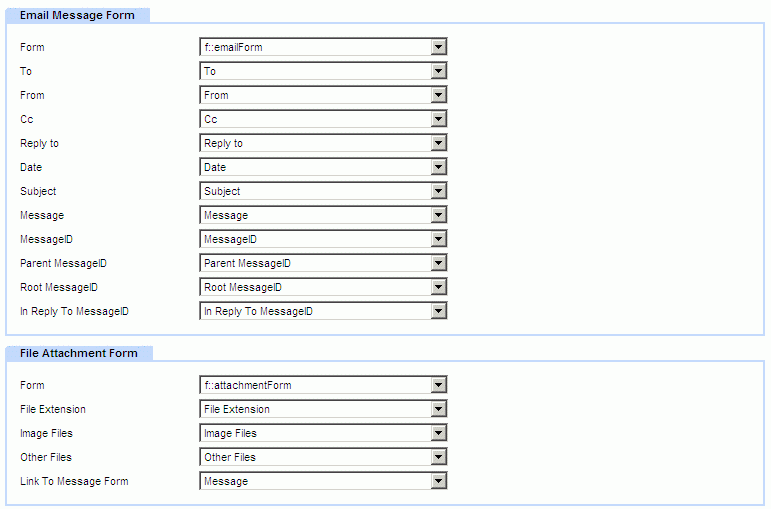
In configuring the Email Table Loader, you need to specify which field in each form should receive the various parts of the email.
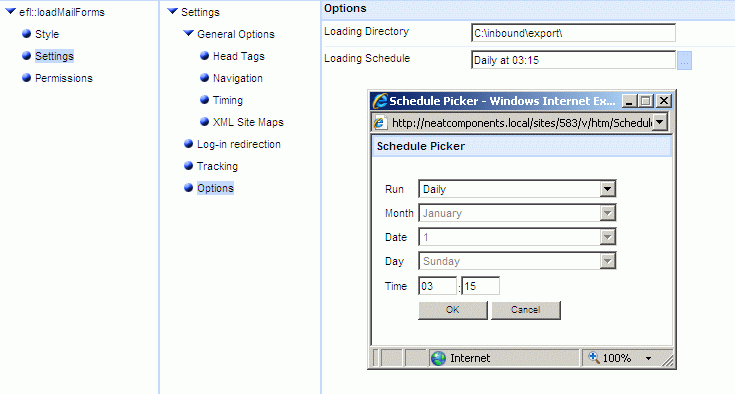
In the Behavior Editor you select the location on the disk where the email will be loaded from, and a schedule for when it should start the loading. Typically every few minutes.
When the Email Table Loader creates a record the Record Change event for that Table is triggered. So for example you could create a notification email to be sent out if an email was loaded that matched some criteria. Be careful to avoid creating message loops, where the email generated also gets loaded in by the Email Table Loader, triggering another email, etc.
Using a trial or cloud server?
The Email Table Loader component is designed for enterprise deployments where you are in control of your own dedicated server (which may be local or in the cloud). However if you are using a shared cloud server managed by another organisation, or are trialling the software on a cloud trial, you may not be able to use this component without assistance from the server manager, since the process involves direct access to the server storage volume and the configuration of external software.
| 


