Data handling
The system provides a rich set of data handling tools, based on a relational database model specifically designed for database management in web application creation including data-centric websites.
No coding required
Configuring the data handling requires no coding, no knowledge of SQL. Everything is done through the usual graphical interface.
However you still have access to the underlying power, flexibility and speed of the relational database model.
Data is acquired in the Data Feeds, stored in Tables, sorted and manipulated in Queries, prepared for presentation in the Views, and the output is embedded on a Page.
The diagram below shows the general data handling flow.

This separation of tasks into different components allows for time-saving re-use - for example you might have several pages using the same View, or several different Views taking data from the same Query.
Application creation
There is no limit to the number of these components you can have on a site, enabling sophisticated solutions to be built up.
Understanding Database Management in Web Application Creation
The system provides a rich array of data handling features that can be used on your websites. These allow a conceptual separation of the information held in the sites, from the appearance of that information on pages. This separation brings flexibility in design, consistency of appearance, organisational efficiencies, and provides support for applications like e-commerce.
On simple websites, it is often practical to simply type the content of webpages straight on the pages. This works well where you have very small sites with ad-hoc descriptive pages. However, when you have multiple pages of the same structure, but different content, it is time to examine the data handling facilities.
A typical example would be an e-commerce site, where there are lots of product pages all with the same layout, or it could be a blog site describing a series of topics in a consistent manner.
There are lots of advantages in using structured data. Some will be immediately apparent as you create the site, whilst others will come in to play later on in the lifecycle of the site – as you need to make changes, and find they are easier than you might have expected. For example:
- Allowing some users to modify the data, but not to affect the display fonts etc
- Managing the validity of data by providing input choices rather than just free-text input
- Allowing content approval flows to approve data that has been entered in forms before displaying it on the site
- Emailing people to inform them of new content
- Showing the same information in different places – and keeping it all synchronised
- Providing search tools to allow users to find information quickly
Tables: Input Feeds and Forms
At its simplest, data handling in the system consists of creating a Data Entry Form, which you then fill in with information, once for each item. This information gets stored in a Table. Then, you can display the information the website visitor entered using the various Views.
A range of data types allow for the intelligent handling of textual, numeric, file and image data, as well as joins between datafeeds.
Data Entry Forms create database Tables of structured information within the site. Users can fill in or edit forms online, and the information can be presented elsewhere on the site. You have complete control over the fields and datatypes in your forms.
Different Tables can be related to each other (in database terminology by one-to-many or many-to-many joins). So, for example, you could have another form of event categories, and set the system up so an event can belong to just one category, or belong to several categories. Users would then be able to browse events by category, and you can extend the list of categories over time.
Tables interact directly with the email sub-system so when a form is filled in, the system can send automatic emails to alert you (for example so you can authorize its appearance on the site, or to thank the contributor). Emails can also be sent to entire usergroups, so you could allow people to 'subscribe' to be kept informed of new entries. You can just as easily provide an RSS feed or Tweet direct.
Data Entry Form-components allow the Designer to give fully structured control over the way information is collected, stored and displayed within the website.
Fully structured webpages can be created to ensure the strictest organizational requirements are fulfilled for content display.
Queries
The system provides powerful data handling tools, based on a relational database model.
Output: Queries and Views
Now you might think that you could simply say to the system that it should display the Form on your page, but to do that would prevent you from having control over the appearance of the list, the order the contents are shown in, and indeed which fields in the form you want to show. To do this we need to introduce a couple of concepts: Queries, and Views.
What happens is that the Form contains the information you typed in, and it is then passed through a Query, where you get to specify which fields to display, and the order they appear in (both left to right, and top to bottom), and this is then handed on to a View, where you can style it, specifying fonts and colours. You then place this on a Page, and the users can see your information.
nC provides four different Views: Table, CSV, Custom and 'Query by Example'
Embedding - paging
When the View is embedded on the page, you can specify some further preferences. For example, if you have a lot of books it might be annoying to have really long pages, so you can choose to show the list in pages of, say 20 books. Then, when the list is shown, it shows the first 20, and then provides paging links 'Showing items 1-20 of 43000' or whatever, with links to subsequent pages.
Query by Example
Naturally, if your list really is that long, paging links like that are still going to be unwieldy when you are trying to find a particular item. So neatComponents provides a method to quickly provide a search form, where users can type in an example of what they are looking for, and then a list of matching results is shown. This facility is called "Query by Example". You get to specify how the search form looks: which fields you will let them search by, and how the form is laid out. You can even add in comments to guide them, or simply pretty it up with graphics.
Dropdown fields
For example, if you want to store the Format of a book, you would want to know if it is Hardback or Paperback. Whilst you could provide a text field for this, people are likely to be inconsistent in how they enter the information: "Hardback", "Hard-back", "Hb", etc. Such variation makes it hard for users to search the list. We can solve this problem by using a Dropdown field.
Recordlink fields
A logical extension of the book example would be to add a category field, so we can say what general topic the book is about. As with the Format field, we have the choice of using a text field or a dropdown field. We can rule out the text field for the same reasons as it was inappropriate for the Format field. However, the dropdown field has its own problems here. The issue is that whilst the Format values of Hardback and Paperback are limited in number and unlikely to change, there will be many more categories, and they are likely to be added to and amended frequently. This makes the categories list a good candidate for being given its very own Form. This Form can be very simple: it only needs a single text field, "Name", to contain the name of the Category. However, splitting it off like this allows it to be managed by users who you don't want to mess with the format of the Book form. Once we've created the Category Form, and entered the various category names in it, we can return to the Book form, and add our Category field. We can now use the recordlink datatype, which operates in the same way as the dropdown field, except that instead of listing the categories out within the Book Form, it simply refers (or 'links') to the Category Form. See a worked example of using the Recordlink field.
It is worth noting that the Query, despite showing information from both the Book and the Category Tables, only has to contain the fields from the Book Table. The names are taken automatically from the Category Table without you having to specifically include it, making Query construction quick and intuitive.
A range of data types allow for the intelligent handling of textual, numeric, file and image data, as well as joins between datafeeds.
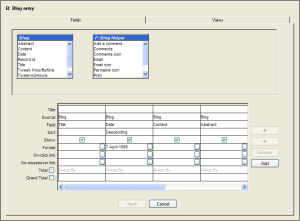 There are two types of component that are used to handle data output:
- Queries: Queries allow you to sort, and select the raw information provided by the data feeds.
- Views: Views take the output from a Query, and present it to users in a variety of ways: from a simple table of information; scrolling news tickers; calendars, etc.
There is no limit to the quantity or complexity of the data structures. Advanced features allow for the efficient presentation of vast amounts of information, and tools provide elegant handling of hierarchical data structures.
All components are configured from control panels - there is no programming or code debugging to do. Ever.
The Table-Query-View system also allows the construction of multiple data-entry pages, booking systems and many other web-related database manipulations, without having to do any programming or learn the intricacies of advanced database programming and relational database integration.
The Graphical User Interface allows the Designer to construct forms and their related pages quickly and then preview the effect online.
Email integration
neatComponents has an Integrated Email system to automatically notify Designers and Users when specified events take place.
The whole neatComponents system is conceived to remove as much of the Administrative burden of website management and development as possible. When tasks do require action, such as the completion of a form, or the moderation of a page, the site will automatically email the responsible person, complete with the URL for the page in question.
Emails can be sent to named individuals, or where appropriate, whole User Groups.
Components available to use in data handling
This is a list of the components involved in the storage and presentation of data. (However this list does not include components used elsewhere which might affect the creation of some of the data - for example in the user subsystem)
Data Feeds
The Data Feeds store data (in the case of the Table) or provide access to data stored elsewhere, eg the order transaction data e-commerce records and the user management sub-system. |
Components:
Form-related & Data Feeds
- Table
- Data Entry Form
- Email Table Loader
- External Lookup Data Feed
- Account Data Feed
- Account Invoice Data Feed
- Account Payment Data Feed
- Cart Item Data Feed
- Order Charge Data Feed
- Order Data Feed
- Order Item Data Feed
- Order Payment Data Feed
- Referral Data Feed
- Search Log Data Feed
- User Data Feed
- User Membership Data Feed
The Query allows data feeds to be selected,
choice of fields, sequencing of records, and definition of links.
Complex queries can be defined which work with information 'joined' from several data feeds at the same time. |
Component:
Query
Views
Built-in to the Query:
- Grid
- CSV
- Custom
- Query by Example **
Components:
The Views allow precise control over the visual appearance of the data provided by the Query. The wide range of Views reflect the different ways in which data can be presented. |
- Calendar View
- Category View
- Custom View
- DirectURL View
- Drop Down View
- IFrame View
- List View
- Redirect View
- Sale View
- Search View **
- Ticker View
- vCard View
** The 'Query by Example' and 'Search' views are 'Criteria specifiers' which are displayed as a form to users to collect information which is then used as additional criteria to restrict what is then shown in a view shown to them on the 'next page'.
Page
The Embedding of a view on a page allows the criteria to be set restricting the view to display only certain records, and, if appropriate, manages the paging of records so there aren't too many shown at once. |
Views can be embedded on virtually any page or rich-text surface. By embedding a view onto a Custom View of another Query, you can even create 'sub-queries' where the criteria are nested, allowing for sophisticated effects with the minimum of effort.



