 |
|

|
clearString neatComponents
|
|
clearString neatComponents What have I got? |

| ||
| Application Development | |
What have I got? | ||
| |
Responsive Container
All apps use a 'website' as the container and the delivery system, so we start by understanding your work-space - a 'site'.
The Starter Site we provide is already a Responsive container: depending on the screen-width it will either display standard desktop navigation or standard mobile 'hamburger' navigation. Apps created in clearString function at any scale, however the app construction toolset is designed for desk/laptop.
When you open your Trial you will see a small site with a simple tabbed navigation-bar, as shown below. We have kept this site as simple as possible, so there are no images, banners or fancy navigation to start with. In this Tutorial we are concentrating on the structure.
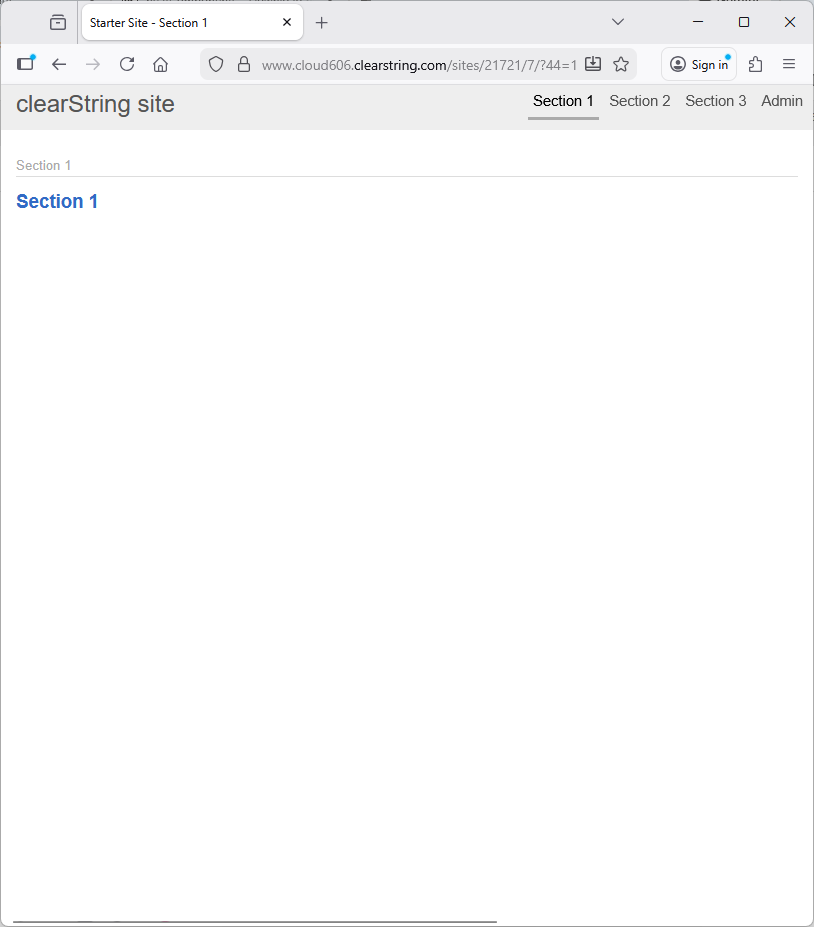
It has the following parts:
- A simple 'clearString site' name banner at the top (we'll see how to change that text later)
- Section 1-tab (selected with a page to view)
- Section 2-tab
- Admin-tab (mouse-over for a drop-down menu)
Pages and Layout
In the example shown above there are two main construction elements: the Page and the Layout.
- The Page holds the non-repeating information - the regular content in the 'body' of the page'.
- The Layout controls the repeating elements at the top of the page - the head graphic and the navigation.
This is a component-based app construction system. The components are used to build an app in a conventional tree-structure. A basic principle of the system is that the content of the app is divided from the web appearance: you control what is in the site - the 'data', separately from how it looks.
There are many different types of component. This example only uses a few components and features, and describes only the minimum of the settings - just to keep things simple while you are getting started.
In the next step we will edit a page on the site:

Creating your first app In this section |
|
Creating your first app
We learn what the tutorial site looks like. We learn how sites are made of pages, and how each page is surrounded by layout elements. In this section: |
|
 What are we learning here?
Copyright © 2026 Enstar Systems Inc. All rights reserved |